
Visual bug reporting and feedback tool for engineers
Videolink lets your AI agent turn PRs, bugs, and product feedback into short videos, preventing going back and forth over feature development.

Trusted by 5,000+ users worldwide
"Videolink shortened our review cycles. Instead of long comment threads and follow-ups, I just leave feedback directly on the exact moment in the video. Engineers immediately understand what needs to change."

Daniel K.
Product Manager • B2B SaaS company
"Even a 50-second walkthrough prevents wrong assumptions and saves us a huge amount of time."

Jane M.
Engineering Lead • Product team at a SaaS company
"Making video part of the workflow makes engineers double-check whether what they've built actually works. That alone has improved the quality of what we ship."

Michael K.
CTO • B2B Software company
How it works
Don’t worry, you're not switching tools. You're simply asking your agent through Videolink's MCP server to create, search, and summarize videos.
1//
Record the issue or walkthrough
Record the issue or walkthrough
Use the browser extension, desktop app, or let your AI agent record via Playwright. Capture your screen, camera, or both.
2//
It adds context automatically
It adds context automatically
Capture browser metadata, console logs and network state alongside your recording. Bug reports get structured automatically. Videolink detects and blurs sensitive data, like API keys.
3//
Integrate with your tools
Integrate with your tools
Post directly to GitHub, Jira, Linear, Slack, Notion, Asana, or Monday.com. Or share a link with granular access controls
4//
Feedback happens inside the video
Feedback happens inside the video
Reviewers leave comments directly on the video, tied to the exact moment. So, back-and-forth that used to take five comments takes one timestamped note.
Record. Share. PR approved.
Instead of wasting time in a long Slack thread or a meeting, just get to the point faster with a quick video.

Bug Reporting
Record the bug as you see it. Videolink captures the steps, the browser state, and the behavior, then files a structured report to Jira, Linear, GitHub Issues, or any tracker you use.

Product Feedback
PMs show expected behavior visually before implementation is finished. Engineers see what the PM actually means, not just the spec text, so misalignments get caught before code is written, not after.

PR Reviews
Record a quick walkthrough of your changes so reviewers get why the change is happening, preventing PRs from going back and forth.

Demo Your Work
Ship a feature? Record a 60-second demo. Product, design, and leadership see what you built, without scheduling a meeting or writing a doc nobody reads.

Async Communication
Standup updates, handoff context, debug sessions. Simply record once, share with the team.

Onboarding
Every PR walkthrough and bug report becomes searchable knowledge. New engineers learn from real context, not outdated Confluence pages.
Camera shy? Let your AI agent record for you
Instead of wasting time in a long Slack thread or a meeting, just get to the point faster with a quick video.
➡️ Generate video walkthroughs from pull requests
➡️ Create video bug reports from text descriptions
➡️ Record via Playwright (no manual screen capture)
➡️ Auto-post videos to PRs, tickets, and Slack

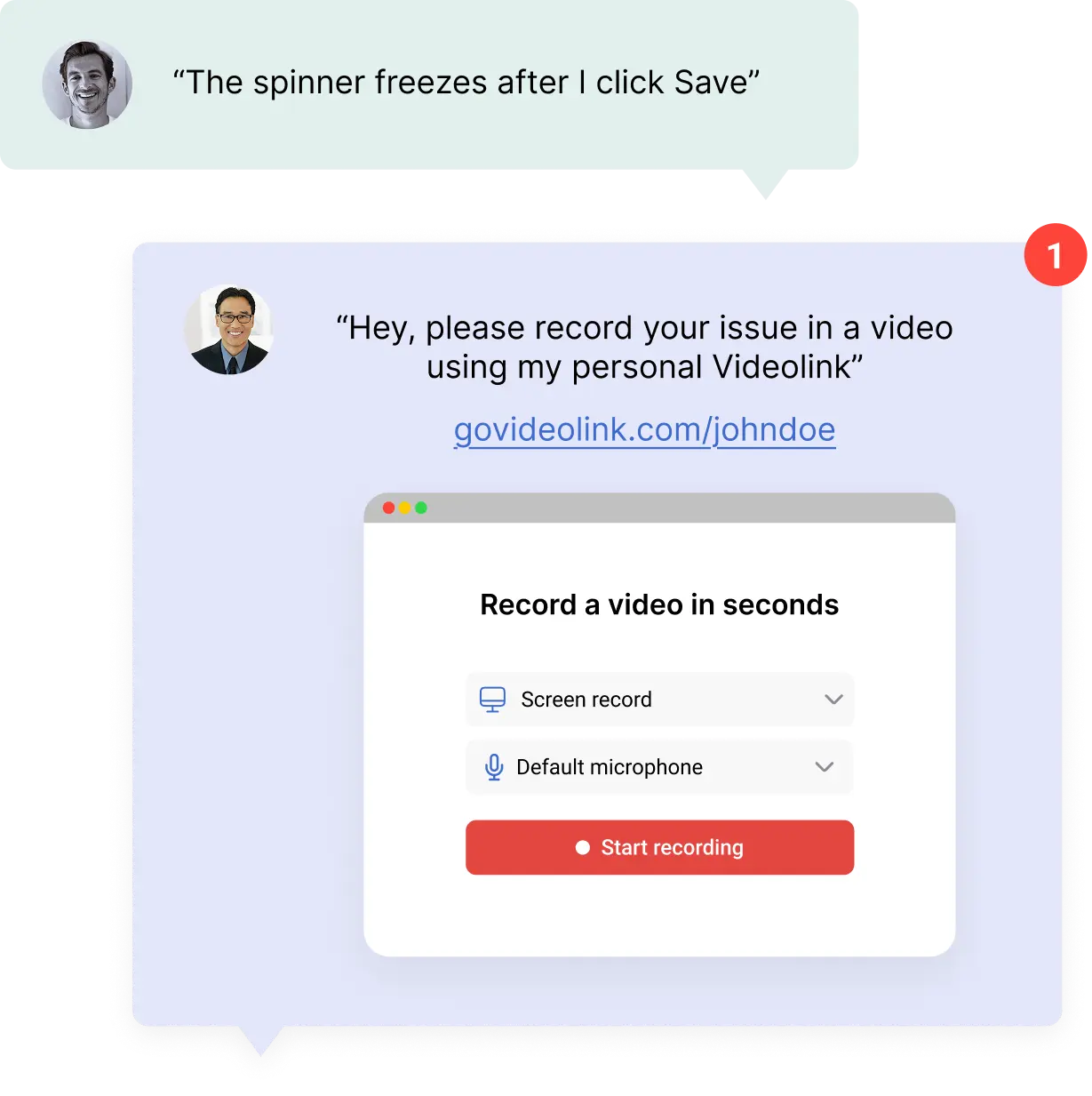
Request a video from anyone (inside or outside your team)
Need a QA engineer to show you the bug? Or you maybe need a customer to record their issue? With Videolink you can create a request link. They record and submit, no account or install needed.
Integrations
Generate videos for tickets or create tickets from videos. Two-way sync with popular tools.




+ any task management tool connected to your agent via MCP
Security
Your recordings stay under your control. Videolink doesn't access your source code unless you explicitly allow it.
Code access only upon request
Videolink only sees source code when you explicitly grant it. By default, no code is read, stored, or transmitted.

Scoped permissions
Every video has its own access settings. Keep it internal, share with specific people, or open to external stakeholders. Nothing is public by default.

Sharing controls
Every video has granular sharing settings. Keep it internal to your team, share with specific people, or open it to external stakeholders. You decide per video.
Frequently asked questions (FAQ's)
How is Videolink different from Loom?

Loom is built for general async video. Videolink is built specifically for engineering workflows. It integrates directly with GitHub, Jira, Linear, and other dev tools, auto-captures browser metadata and console state with bug reports, and lets your AI agent record videos for you. You're not context-switching to a separate recording app, Videolink lives inside the tools you already use.
Do I have to record videos myself?
You don’t have to. Videolink's AI agent feature lets your existing AI agent (via MCP) generate videos on your behalf, like PR walkthroughs, bug report recordings, and demos. You can also record manually using the browser extension or desktop app when you prefer.
Does Videolink have access to my source code?
Only if you explicitly allow it. By default, Videolink doesn't read, store, or access your source code. When using the AI agent for PR walkthroughs, your agent reads the diff locally, but Videolink only receives the instructions to generate the video.
Can non-engineers use it to give product feedback?
Yes. Product managers can record expected behavior visually and share it with engineering before implementation starts. This closes the gap between spec and intent, so engineers see what the PM actually means, not just what they typed.
Close feedback loops faster
Record it. File it. Move on.
Videolink handles the rest.
Videolink handles the rest.
Your recordings stay under your control. Videolink doesn't access your source code unless you explicitly allow it.